LogoOralSlides
  • Features
  • Pricing
  • Compare
  • Blog
  • Docs
Localize a Training Deck into 10 Languages Without Re-Recording
2026/07/01

Localize a Training Deck into 10 Languages Without Re-Recording

The traditional localization pipeline re-records every video per language. Here's the deck-first alternative — one .pptx, one script review per language, ten narrated MP4s.

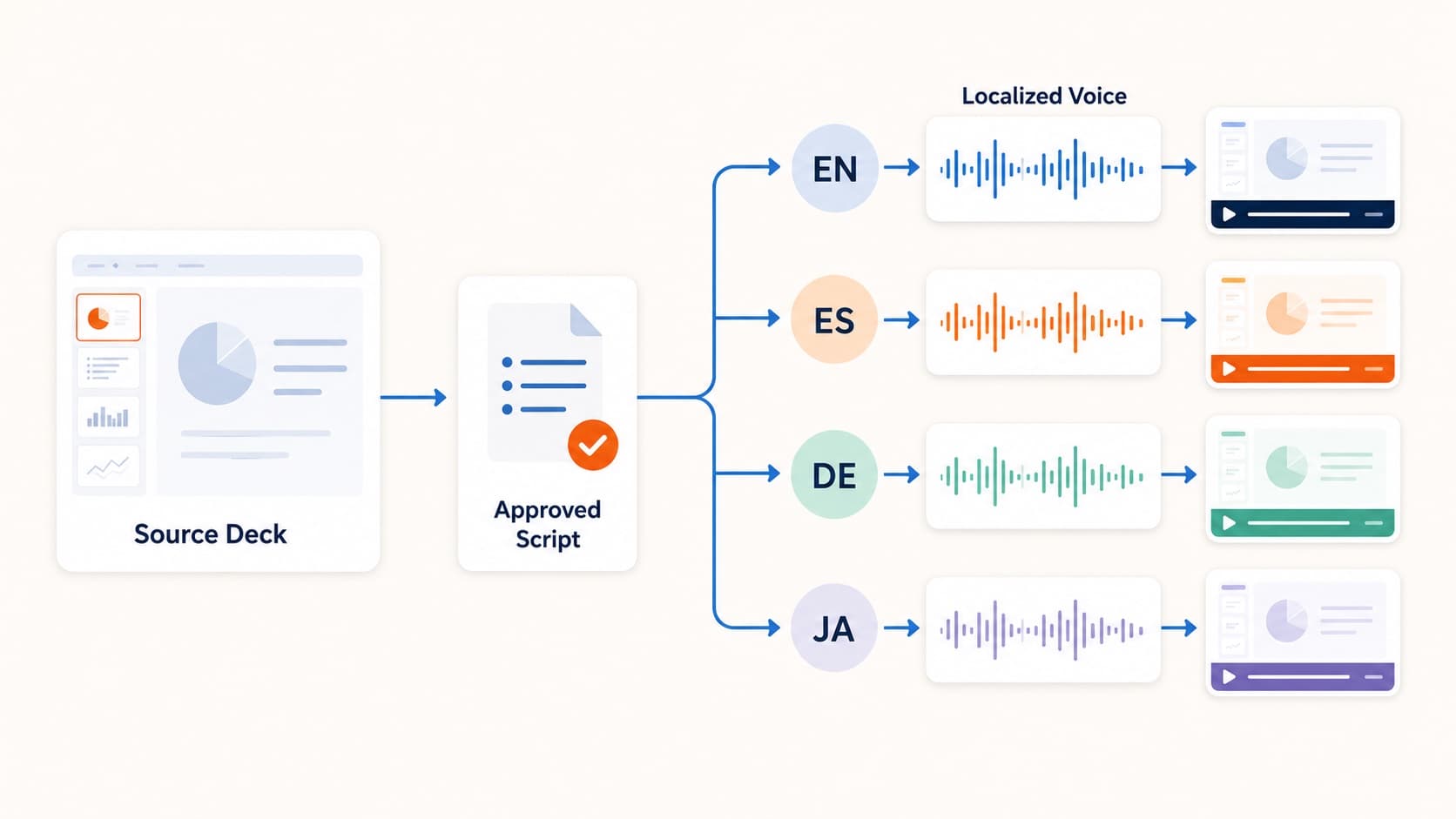
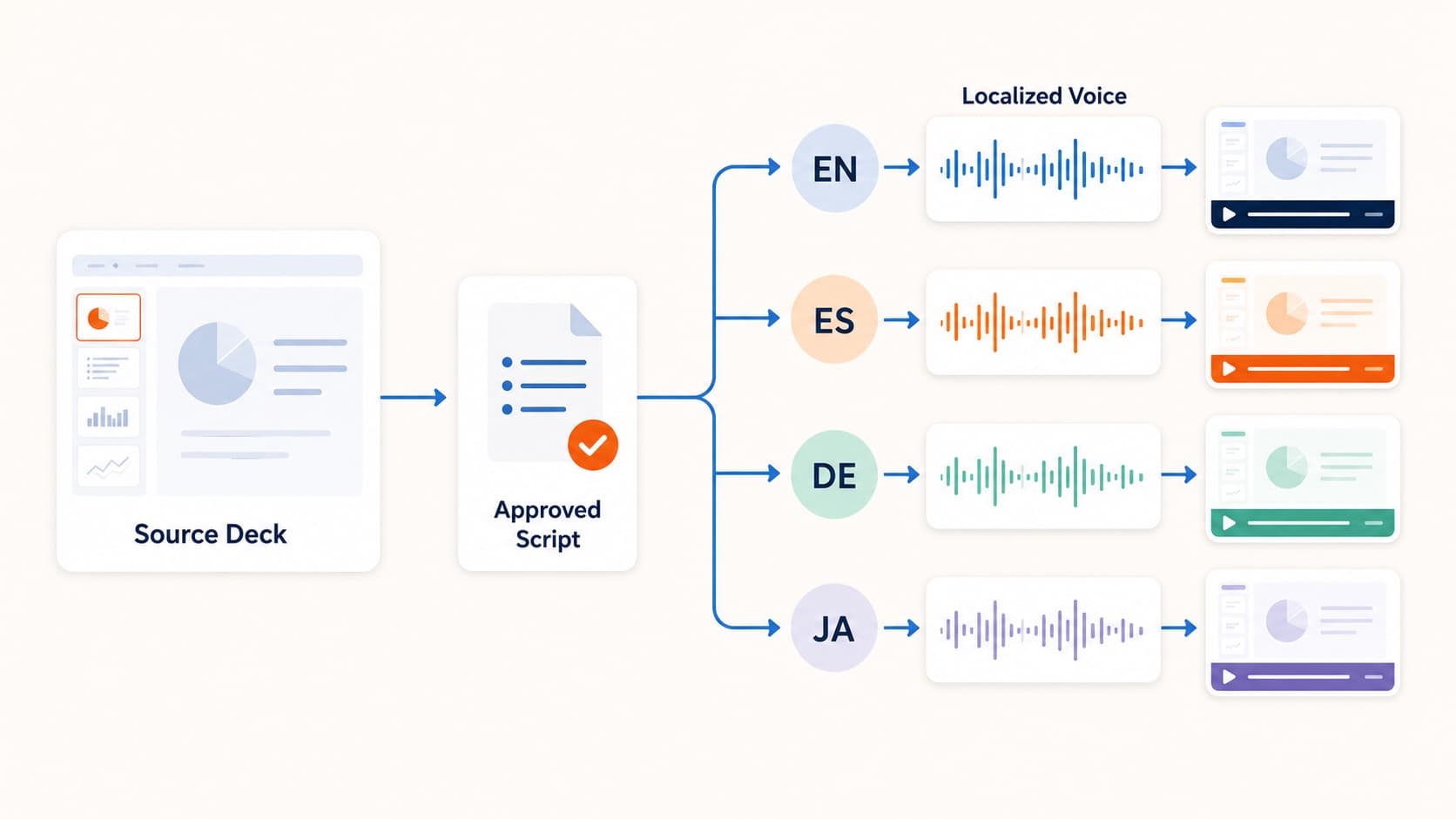
One deck localized into multiple narrated videos

The traditional way to localize a training video multiplies everything by the number of languages: translate the script, book a native voice artist per language, record, sync each recording to the visuals, QA each output. Ten languages means roughly ten times the cost and calendar time of the original — which is why most companies localize only their top two or three markets and let the rest watch the English version with varying comprehension.

The deck-first pipeline breaks that multiplication. If the video is generated from a .pptx and a script, then localizing it is a text problem, not a studio problem.

The deck-first localization pipeline

The structure of the workflow:

  1. Finalize the source deck once. The .pptx is the shared visual layer across all languages. Charts, screenshots, and layout are identical in every output.
  2. Generate and polish the source-language script. This is the master text. Effort spent here transfers to every language, so do the script editing pass properly once.
  3. Produce the script in each target language. Machine translation gets you a draft; a native-speaking colleague reviewing it gets you quality. Reviewing text takes a fraction of the time of directing a recording session.
  4. Pick a voice per language and export. OralSlides ships 40+ voices across 10 languages, so each market gets narration in its own language, not accented English.

The key property: steps 3 and 4 are the only per-language work, and both operate on text. No studios, no scheduling voice talent across time zones, no audio syncing per language.

What changes when the update arrives

Localization pain isn't really about version one — it's about version two. Compliance training changes annually. Product training changes quarterly. In the traditional pipeline, a two-slide update means re-booking voice talent in every language, or shipping videos where one section suddenly sounds different from the rest.

In the deck-first pipeline, an update is: edit the two slides, update those script segments per language, regenerate the affected audio, re-export. The other languages don't drift out of date waiting for studio availability, and per-slide regeneration means you never re-render narration that didn't change.

Honest limits of AI localization

Three things to keep in view before committing:

  • Machine translation needs a human check. For compliance and safety content, an unreviewed translation is a liability. Budget a native-speaker review per language — it's the one per-language cost that shouldn't be optimized away.
  • Slide text stays in the source language unless you localize the deck itself. For many teams a source-language deck with local-language narration and subtitles is acceptable; for customer-facing content you may want per-language deck variants. The visuals-in-English, voice-in-local-language pattern works best when slides are chart- and screenshot-heavy rather than text-heavy.
  • Synthetic voices, not native presenters. For internal training this is almost always fine, and viewers increasingly expect it. For brand-forward external content, weigh it the same way you would in one language — the AI narration vs human voiceover piece covers that decision.

Where this pays off first

The teams that get the most out of this pipeline share a shape: recurring content, distributed audience, more languages than video budget.

  • Compliance and safety training that must reach every region in local language, every year
  • Product and process training for distributed operations teams
  • Partner and reseller enablement, where you don't control the audience's English level
  • Course content expanding into new markets without re-shooting lectures

If the English version of your training already lives in PowerPoint, you're one script review away from each additional language. Start with the internal training workflow if you haven't built the source pipeline yet, then add languages from there.

All Posts

Author

avatar for OralSlides Team
OralSlides Team

Categories

  • Guides
  • Use Cases
The deck-first localization pipelineWhat changes when the update arrivesHonest limits of AI localizationWhere this pays off first

More Posts

Async Internal Training Videos at Scale, Without a Studio
Use Cases

Async Internal Training Videos at Scale, Without a Studio

How HR, ops, and enablement teams turn quarterly slide decks into narrated training videos employees actually watch — with a workflow that scales to dozens of decks per year.

avatar for OralSlides Team
OralSlides Team
2026/04/20
Why Async Product Demos Beat Live Calls for Most Sales Cycles
GuidesUse Cases

Why Async Product Demos Beat Live Calls for Most Sales Cycles

A pragmatic argument — and a workflow — for replacing the standard 30-minute demo call with a 6-minute narrated MP4 the prospect can watch on their schedule.

avatar for OralSlides Team
OralSlides Team
2026/04/18
How Teachers Turn Slide Decks into Async Video Lessons
GuidesUse Cases

How Teachers Turn Slide Decks into Async Video Lessons

A practical playbook for educators turning lecture decks into narrated MP4s students can rewatch on their own time, without re-recording every term.

avatar for OralSlides Team
OralSlides Team
2026/04/22

Newsletter

Join the community

Subscribe to our newsletter for the latest news and updates

LogoOralSlides

Slide-aware narration, voice, and MP4 delivery in one workflow

Product
  • Features
  • Pricing
  • FAQ
Resources
  • Blog
  • Documentation
  • Comparisons
  • Changelog
Company
  • Contact
Legal
  • Cookie Policy
  • Privacy Policy
  • Terms of Service
© 2026 OralSlides. All Rights Reserved.